Talking about Microsoft's oPhone
Very amusing video I stumbled across on.
Too good not to share!
Video: Microsoft's oPhone
Very amusing video I stumbled across on.
Too good not to share!
Video: Microsoft's oPhone
Microsoft Project Server 2007 and Microsoft Project Professional 2007 180 day trials are now available for download.
You'll just need to register and then you'd be able to download it.
Once you've downloaded the software you can get some good resources on planning and deploying Project Server 2007 from Microsoft Technet.
I got this Certificate of Appreciation in my mail last week. The cert is signed by Bill Gates (more like printed). Was involved in some beta testing on the 2007 Microsoft Office System.
It's kinda of cool. I only have a few issues (not to be ungrateful):


I've been wanting to post about my experience in implementing and deploying MOSS 2007 Beta. This wasn't the easiest of things to do really. Today, that implementation has gone out as successfuly case study and we're looking into deploying MOSS 2007 for production in the near future.
10 of the valuable things I've learnt while implementing MOSS 2007 software in the beta stage and this could be quite a standard thing with most beta products (Microsoft Office 14?):
Those were some of things I've learnt and I believe the most annoying thing was when the software wasn't behaving as it was suppose to it was always a matter of... "was the software mucking up because it's in beta or was I mucking up that the software wasn't doing what it was suppose to..."
It was a good experience at the end of the day!
Of recent when working with clients I've realized to focus on customer relationship building where the process begins with having an emotional (in a good way) element when you establish a connection with your clients.
So what is good relationship building?
Developing and maintaining a win-win partnership where both parties gain, is the essence of a good customer or client relationship. When you have a good and trustworthy relationship with your clients, you're on the path to growth and profitability. Why do I say that? Well, your customer serves as an important reference for new prospects. Their happiness and level of satisfaction serves as a marketing tool (I've seen this happen). Also, the time taken to attract a new client is shortened which might lead to lower costs for repeat business.
The ability to build good customer relationships depends on three things:
Building the relationship
To engage a customer, you need to have good product knowledge, so read all the material you can possibly get on your product, and I think using it is definately a plus! By having the right information and tools on the product, you will feel empowered to handle most questions.
Your soft skills or people skills, and your positive attidude help you in connecting with the customer. Show your sincerity in identifying what your customers value.
I hear this term quite often where "listen to your customer as opposed to merely hearing him". Where you seek to understand them from their frame of reference. Listen carefully to what they say and notice hints they about their interest.
Maintaining the relationship
To maintain good customer relationship, we need to store some data on customers' interest in order to target them selectively. I also believe that simple gestures like sending a greeting card or a thank you card do help strengthen the relationship. Also attending to their complains and attending to them punctually also do help.
Been working on WSS 3.0 recently and discovered the not so MOSSY part of it. I created a subsite within the site collection and noticed something about the Quick Launch. Adding links into the quick launch is not a problem. The problem was when you wanted to save it as a site template and reuse it somewhere else.
E.g. I have a site http://servername/division/departmentA. I've done that site and have links within the site to point to specific lists. e.g. "/division/departmentA/lists/Issues."
The problem was if I saved this template and tried to create a new site. The Quick Launch links would be persistent which is "/division/departmentA/lists/Issues". So how do I get it to point to my new site I created.
As pointed out by Rai Umair (the legend!), remove the starting slash! The working link entered in the link textbox should be "lists/Issues" (Note: no slash and link pointing from site only, without the inverted commas). Now after you press OK and come back to the page you will see that the link will change to look like the original one but it still works in new sites based of the Site’s Site Template.
One of the many things that drive you insane till midnight and someone fixes it at 1am! Try it!
Thanks (Muchos Gracias) to a posting on MSD2D by Herman Vargas and my colleague, Mario Barajas for translating all the comments that were in Spanish. I've managed to modify the script for a SharePoint 2007 backup. Not the best out there, but it's something.
I have not tested the script fully and assume that it would work. The script keeps the 5 latest backup copies. You can modify the following to suit what you need:
C_BackupPath : The path where the backup resides
C_NamePrefix : Prefix of the filename of the "backup prefix". Example: SharePoint_20070228
C_SiteURL : The URL of the SharePoint Site to be backed up
C_SharePointBin: Path to the Bin directory of Sharepoint installation
C_MaxBackupPerFolder: Number of XML Manifest per C_BackupPath folder.
Below is the .vbs script:
' Description:
' Tool for planning and automating files/entries
' Microsoft Office SharePoint Server 2007
'
' Will generate file entry names with the following style: MOSS_YYYYMMDD
' E.g.: SharePoint_20070228
' If there are more than 5 entries in the directory, then it will choose the one with the oldest date and will delete it
Option Explicit
Const C_BackupPath = "C:\Backup"
Const C_SiteURL = http://sharepointserver/site
Const C_NamePrefix = "SharePoint_"
Const C_SharePointBin = "C:\Program Files\Common Files\Microsoft Shared\Web Server Extensions\12\Bin"
Const C_MaxBackupPerFolder = 5
Dim fso, folder, filedate, f, file
Dim sBackupPrefix
Dim CntXml
Dim DeletedBackup
Set fso = CreateObject("Scripting.FileSystemObject")
if Not fso.FolderExists(C_BackupPath) then
WScript.Echo "The folder " & C_BackupPath & " does not exist!"
WScript.Quit
end if
Set folder = fso.GetFolder(C_BackupPath)
filedate = now
Set f = Nothing
' Counts the number of XML manifests that are in the directory
CntXml=0
for each file in folder.files
if lCase(right(file.name,4)) = ".xml" then
CntXml=CntXml+1
end if
next
'WScript.Echo "CntXml... " & CntXml
DeletedBackup=""
' If it is greater than the maximum
if CntXml > C_MaxBackupPerFolder then
' Looks for the older entry/file
for each file in folder.files
if lCase(right(file.name,4)) = ".xml" then
if file.DateLastModified < deletedbackup =" lcase(Mid(file.name,1,Instr(1,file.name," filedate =" file.DateLastModified">"" then
for each file in folder.files
if lcase(mid(file.name, 1, len(DeletedBackup)))=DeletedBackup then
Set f = file
f.delete
' WScript.Echo "Deleting..." & file.name
Set f = Nothing
end if
next
end if
end if
Set folder=nothing
Set fso=nothing
' Assigns a name of the new file
sBackupPrefix = C_NamePrefix & year(now) & right("00" & Month(now),2) & right("00" & day(now),2)
Dim objShell
Dim strcmd
Set objShell = CreateObject("WScript.Shell")
strcmd = C_SharePointBin & "\stsadm.exe -o backup -url " & C_SiteURL & " -filename " & C_BackupPath & "\" & sBackupPrefix & ".bak -overwrite"
objShell.Exec(strCmd)
WScript.Echo ""& C_SharePointBin & "\stsadm.exe -o backup -url " & C_SiteURL & " -filename " & C_BackupPath & "\" & sBackupPrefix & ".bak -overwrite"
WScript.Echo "Backup of site collection successful"
Set objshell = nothing
I think this ad by Microsoft on the the new Vista is quite inspiring.
Video: Windows Vista "Wow" ad
I've been in the midst of trying to upgrade my Project Server 2003 instance to 2007. I encountered an error as below when trying to upgrade WSS2.0 (where all the Project Workspace is kept) to WSS3.0:
Prescan has encountered sites or lists that were not updated because they cannot be accessed using the SharePoint Products and Technologies object model. The most likely reasons for Prescan to skip a list are covered in the Knowledge Base article at: http://go.microsoft.com/fwlink/?linkid=69958&clcid=0x409.
I searched high and low, tried everything as suggested in the Knowledge Base article above. Which I then referred to another Knowledge Base article 923904. I did method 1, it returned no orphaned items and I made sure that root has explicit inclusion on the WSS 2.0 site.
So what do you need to do to get prescan.exe to finish SUCCESSFULLY?
The reason for all this as explained to me by Ada Pan (Microsoft Online Partner Support) that this problem also may be caused by inconsistence of SharePoint databases (Config- and Content-Database). Prescan is checking Sites, which are listed in the config database This process runs without issues. Later Prescan checks the sites which are defined in the content database(s). Prescan is trying to access these sites via SharePoint Object Model. This step fails, because the site is not in the config database.
I've seen this post going around on some blogs. I never imagined it would reach me. Thanks to Eddie, I now have to tell you five things you never knew about me. Here it goes -
I think I've completed my duties in contributing to this "blog post phenomenon" that is taking the blogging world by storm! I wonder what's next?
The fun part is, tagging 5 other people.
This is also officially my first blog for the year!
The company I used to work for which is Fuji Xerox will be collaborating with Microsoft in the Document Management Solutions Field. All these are happening in Japan. We're looking at possible end to end solutions that include input and output!
Read more about it here!
Sometimes document metadata exists inside the document. So how can we update the Document Information Panel and also at the same time update certain fields within the document? By using a combination of content types, the document information panel and quick parts!
You'd probably want to create some Site Columns. Then create a Site Content Type where the Parent Content Type comes from: Document Content Types and Parent Content Type: Document.

Next, add the created Site Columns to the Site Content Type. Then select Document Information Panel settings. Click on Create a new custom template. When the prompt comes up, click Finish. Save the InfoPath 2007 Form Template. Then go back and upload the saved template.
 Then click on Advance Settings. Upload a new document template for the document content type. Be sure to upload a .docx. You can just upload a blank document at this point. Then go to a site and create document library. As soon as you've created the document library, enable management of content types in the Advance Settings for the document library.
Then add the newly created content type to the document library. Once that has been added, click on the content type and click on Advanced Settings to edit the document template once again. When editing the document template you will notice the document information panel appear (Be sure to have InfoPath 2007 installed to be able to view the document information panel).
Then in Word 2007, Insert, Quick Parts, Document Property. Select the Property that you created.
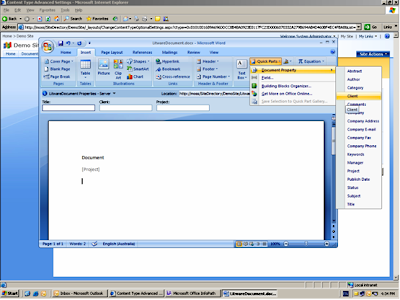
Now when you enter a value for the document metadata in the information panel any reference in the document pointing to it via the Document Property added into the document itself will reflect that!
You can gage the customers readiness in adopting EPM by asking some fundamental questions:
If you had your hopes set on keeping Project Professional 2003 and upgrading to Project Server 2007 that will not be possible.
Project Server 2007 requires Project Professional 2007 as the full-featured desktop client. Project Professional 2003 cannot be used with Project Server 2007 because of the changes in platform architecture.
How do I change the look and feel in PWA? I want to have a corporate feel and change the logo.
You can do that by changing some css files.
Browse to %SystemRoot%\Program Files\Microsoft Office Project Server 2003\IIS Virtual Root\STYLES\1033
Take a look at the PCSTYLES.CSS file.
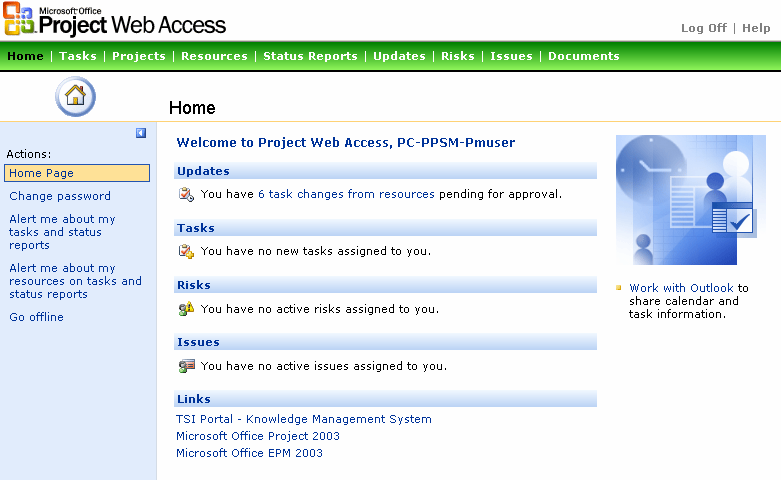
In the image above I've just made some colour changes to the Navigation bar just to show some of the things you can do with the CSS file.
As you should know by now, the EPM solution stack includes ProjectServer 2003, Project Professional 2003, SQL Server 2000 and WSS v2.0. To determine the Service Pack applied to each of them:
Project Server 2003
Check the version of the pds.dll
11.2003.0816 (No Service Pack)
11.2004.0.1707 (Service Pack 1)
11.2005.0.3801 (Service Pack 2)
11.2005.0.4110 (Service Pack 2a)
WSS V2.0 Project Template
There has been no changes since Service Pack 1. The latest service pack just reapplied what was fixed in SP1. To determine SP1 browse to \Common Files\Microsoft Shared\web server extensions\60\TEMPLATE\LAYOUTS\1033\PWAINC.
The date modified of the PWAISSUE.JS should be March 25, 2004.
Project Server 2003 Database
MSP_WEB_ADMIN table and check the values of WADMIN_VERSION_MAJOR and WADMIN_VERSION_MINOR fields.
11,0 (No Service Pack)
11,1 (Service Pack 1)
11,2 (Service Pack 2)
11,2 (Service Pack 2a)
Unable to determine between SP2 and SP2a. If you're really not sure, reapply the SP2a for the database.
Project Professional 2003
Check the version properties of the WINPROJ.exe
11.0.2003.816 (No Service Pack)
11.1.2004.1707 (Service Pack 1)
11.2.2005.1801 (Service Pack 2)
Make sure both Project Server 2003 and Project Professional 2003 are on the latest and same service pack level.
Thanks to Gord Schmidt's post on Service Packs!
The new Microsoft Office Project 2007 user certification program announced at the PMI Congress show will make it easier for organizations to identify skilled project managers.
Click here to read more about it.
We at Unique World have recently finished a successful Microsoft Office Sharepoint Server 2007 implementation at Melbourne Airport!
Read about it here.


